In early summer I came across a site that described how you can estimate a planet’s mass from observations of its moons. That sounded like a perfect “hands-on physics” challenge — and it can be done with Jupiter using Slooh’s Canary Islands telescope.
To complete the challenge you need the moon’s orbital radius and orbital period. The underlying idea is classical: Newton’s law of gravitation plus Kepler’s third law (which Kepler formulated in the early 1600s, and Newton later explained dynamically).
Theory
For Jupiter and a moon, Newton’s law of gravitation can be written as F = G · M · m / a², where G is the gravitational constant (≈ 6.67×10⁻¹¹ N·m²/kg²), M is Jupiter’s mass, m is the moon’s mass, and a is the orbital radius.
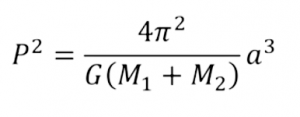
The same force provides the centripetal force for circular motion, so F = m · v² / a, with v the orbital speed. Using v = 2πa / T (T = orbital period) and combining the equations gives:
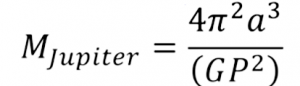
M = 4π² a³ / (G T²)
The moon’s own mass cancels out, which is convenient: we can treat the moon as a “test particle” and still estimate Jupiter’s mass.
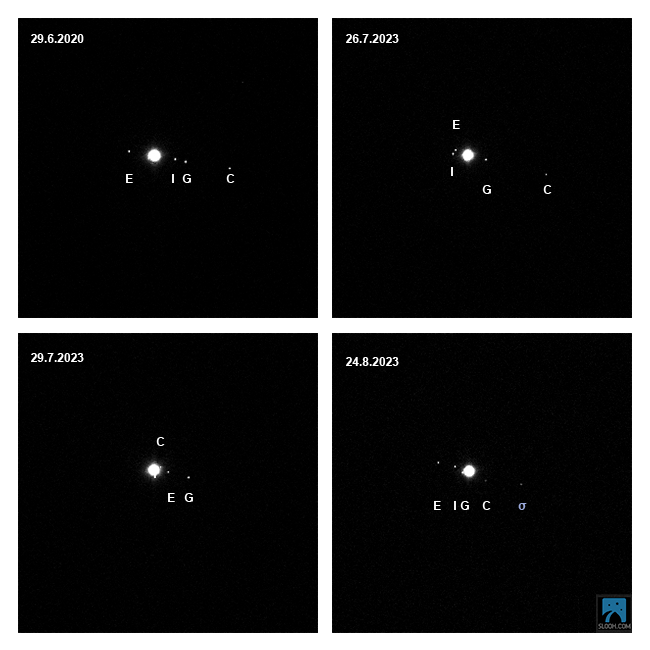
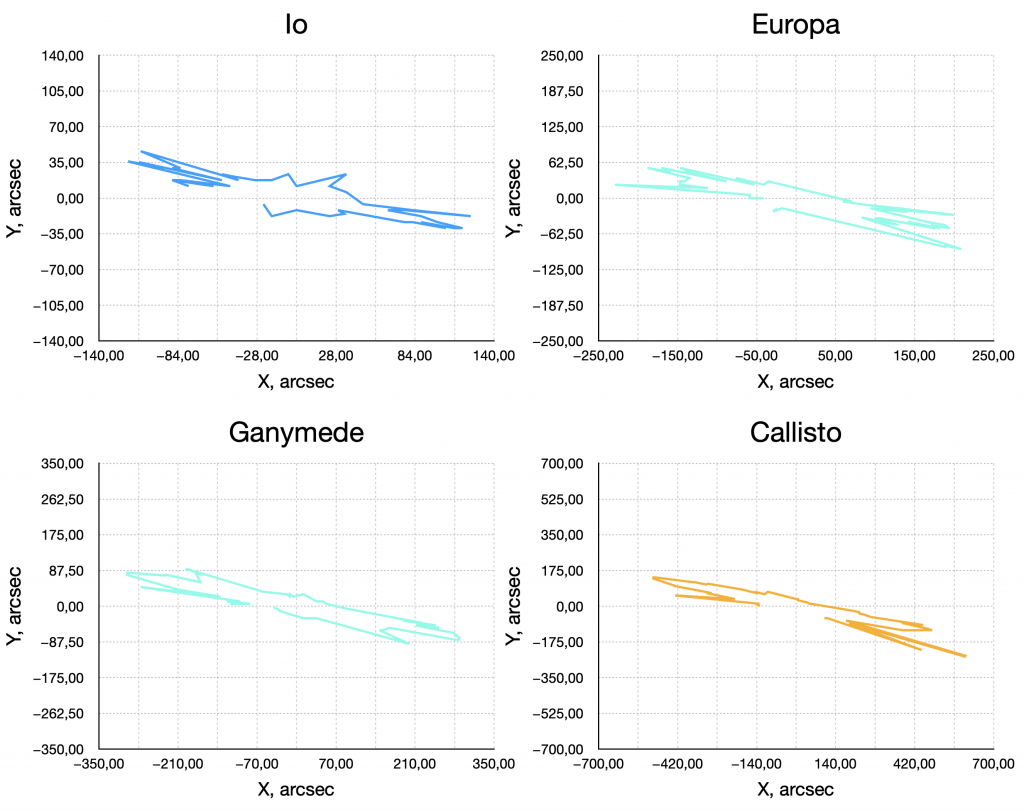
From telescope images we need to measure the moon’s apparent distance from Jupiter at different times. My observations were mostly taken in the early morning hours, and typically I managed to capture a full night’s worth of frames, about every 10 minutes.
I also had older observations available, which helped to cross‑check the measurements and reduce the effect of occasional poor seeing.
Observations
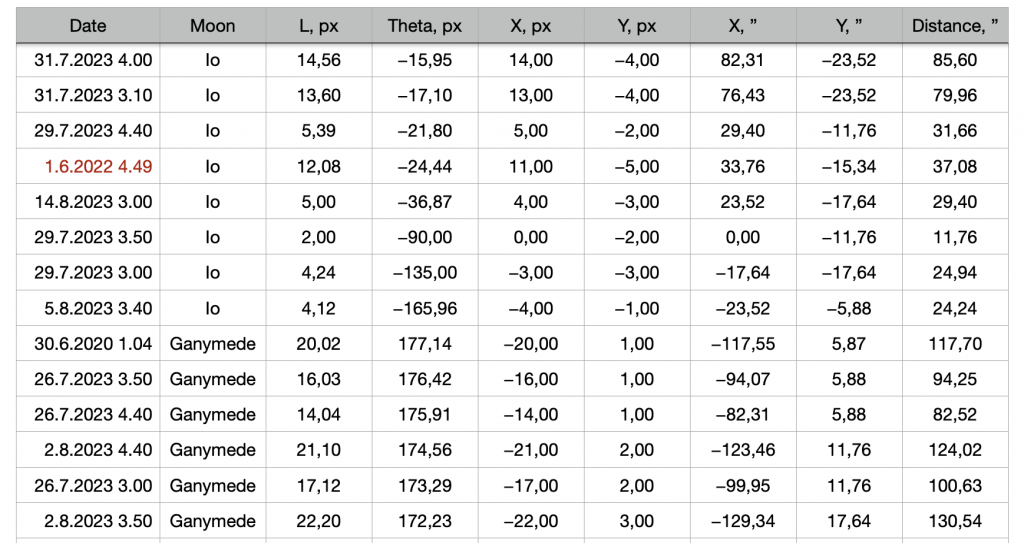
The key practical step is converting image measurements (pixels / arcseconds) into a physical orbital radius. For that you need the image scale and the Earth–Jupiter distance at the time of observation. With those, an angular separation becomes a linear distance.
Measurements
In practice, the Galilean moons move enough during a night that you can track the orbital motion clearly. By comparing multiple timestamps you can estimate the period (or use a known period and focus on estimating the radius).
Calculation
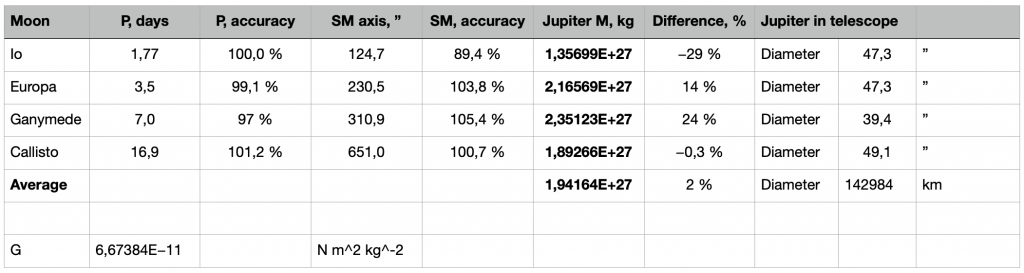
Once you have an estimate for a and T, you can plug them into M = 4π² a³ / (G T²). The result is gratifyingly close to Jupiter’s accepted mass, considering that the measurements come from ordinary amateur images.
This is a great example of how classical mechanics becomes very concrete: by watching a moon orbit, you can infer the mass of the planet that holds it.
A Tip to Get Data of Galilean Moons q
For Jupiter, you can also do this kind of calculation via the Sky & Telescope website. The website has a pop-up tool called Jupiter’s Moons that simulates Jupiter’s moons, which can be launched from the website link “interactive Jupiter’s Moons tool” or the website link “Jupiter’s Moons interactive observing tool”. The tool cannot be launched other than by searching for one of the links on the website.
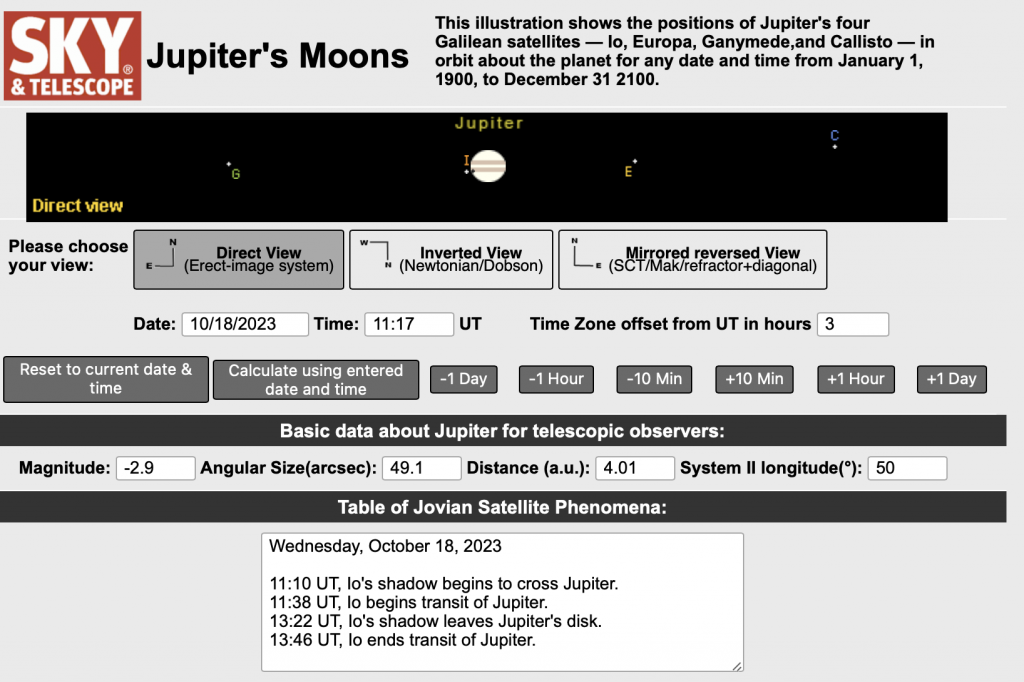
The screen has several sections. At the top is a graph showing the positions of Io (I), Europa (E), Ganymede (G), and Callisto (C) relative to Jupiter. Below the graph are three buttons that allow you to change the orientation of the graph to match the view from your telescope. “Direct View” sets celestial north up and celestial east to the left; the routine opens in this orientation, which is used in most star charts. “Inverted View” sets south up and west to the left, which matches the view from a Newtonian telescope in the northern hemisphere. “Mirror Reversed View” sets north up and west to the left, which matches the view from most catadioptric (mirror lens) and refractor telescopes used with a star-diameter telescope in the northern hemisphere.
The tool is initialized to the current time based on your computer's clock, but you can change the date and recalculate to get data for other dates between 1900 and 2100. You can also use the adjacent buttons to move back or forward in 1-day, 1-hour, or 10-minute increments.
The Jupiter Moons tool displays Universal Time (UT, the same as Greenwich Mean Time). To the right of the date and time boxes is a box that shows the offset between UT and your local time.
The following are some basic information of interest to observers: apparent brightness, the angular diameter of Jupiter's disk in seconds of arc, Jupiter's distance from Earth in astronomical units (a.u.), and the System II longitude of Jupiter's central meridian, an imaginary line running from pole to pole in the center of the planet's disk. This is a useful indicator of whether the Great Red Spot, located at about 100° System II longitude, is visible.
When I tried a similar calculation, the tool was easy to find the correct distances and orbital periods at which Jupiter's mass would coincide with all of the moons. Try it too, 🙂