Where are the asteroids?
About 20 months ago I started observing the sky from home with my Seestar S50 smart telescope. The experience has been mostly positive, as I wrote a little over half a year ago. This time I’ll describe how I’ve customized my workflow for finding the paths of asteroids that are suitable for observation.
A year ago we were granted an observer code by the Minor Planet Center (MPC), M65. Since then I’ve been making asteroid, comet, and similar observations now and then—in between the “prettier” targets.
The hobby gained an extra twist when I also got excited about using the remote telescopes I have access to via Slooh. With those you typically have to settle for one target per night, but on the other hand you can reach fainter targets than with the Seestar.
On the MPC website you can search for asteroids and comets visible from your own coordinates and observing time. The service is a bit slow, but reliable. The result is a list of targets with increasing magnitude for up to 12 hours from the chosen start time—limited to the number of objects you request.
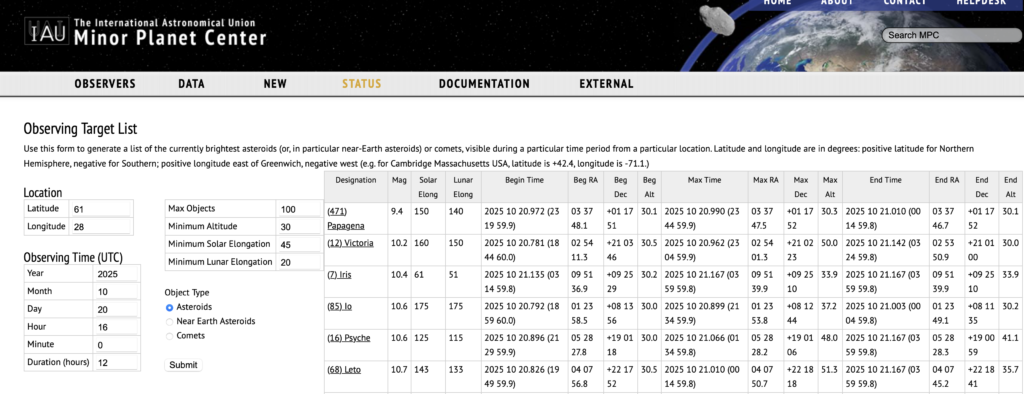
For each object, you can get (for up to 100 asteroids) the name, magnitude, the time and position when it becomes visible, the time and position of its highest point, and the time and position when it fades. In practice, Seestar’s field of view is over half a degree, and asteroids usually move only a few arcminutes during a night. So the key anchors are the times—and after that, everything is clear…
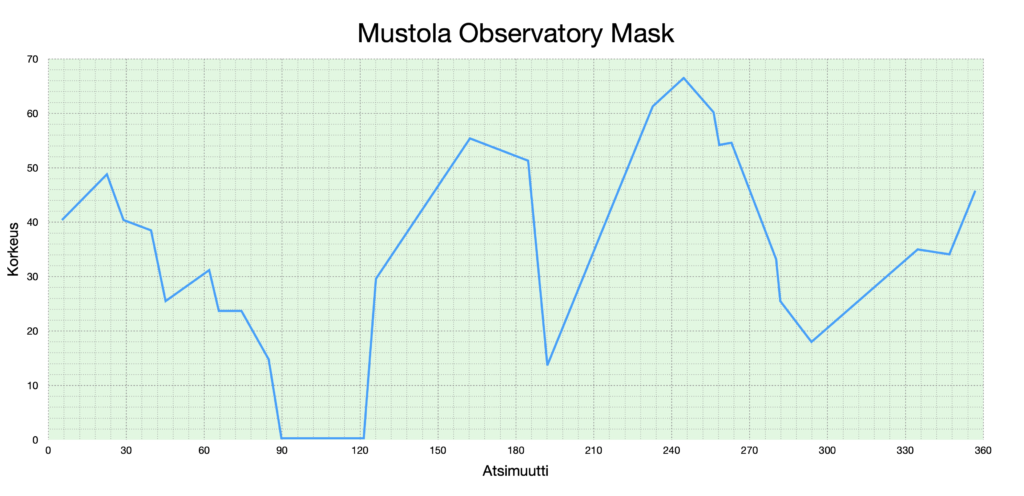
Except that here at Mustola, our own trees and the neighbors’ trees block a lot of objects below 50° altitude. Fortunately, the eastern sky is more open—darkness reaches it first anyway. In practice I’ve copied the MPC table into a spreadsheet (copy/paste), sorted targets by time, and then checked them in Stellarium. Stellarium has our home coordinates, and I’ve masked the lower sky according to our obstruction curve. Then, asteroid by asteroid, I’ve checked whether it stays visible and selected an observing time.
Finding asteroids this way works well, but it becomes a bit repetitive—and you start thinking about what parts could be automated.
Can AI make asteroid hunting easier?
I considered writing a program that would avoid spreadsheets and the laborious Stellarium checks, since all coordinates are known. If I could also output a ready-to-run schedule file for the Seestar, observing would become much more effortless. For Slooh you still need to enter times manually in the browser, but even there some steps could be sped up.
I brought in ChatGPT 5 for help—earlier it has assisted me with programming with mixed success. I defined my goal as precisely as I could, and within one day we had a working skeleton that finds suitable targets much faster. Even that alone would have let me choose coordinates much more efficiently.
But I also wanted the targets filtered to Mustola’s field of view—and of course there’s no point in “discovering” objects I’ve already observed. In addition, the first version relied on using the macOS Terminal, where commands are typed for each telescope separately. The end goal would be a small user interface.
I assumed these would be easy—or at least only a small effort. But no: it took a good week to get everything running.
When you use AI as a helper, you also (unintentionally) give up some control. It’s genuinely helpful in planning code because it knows the “grammar” of a programming language extremely well. But you also inevitably fall behind yourself. I tried to stay consistent and describe fixes clearly, copied error messages into the prompt, and pasted the code I had modified. The AI “conversation” has improved quickly—after all, not long ago it would say it couldn’t “read” an image or a text file.
Don’t count your chickens before they hatch…
Sometimes we moved a step or two forward, then a step or two back. At times I got finished files; at other times just a suggestion to add or replace small snippets of code. Those did help me understand the code a bit—but overall it still felt strange. When the goal is to fix a tiny detail with a small change, you don’t always have the patience to study what’s already been done. I’m sure we restarted hundreds of times, and I noticed that explaining the situation didn’t always work the way I expected.
For example, I had provided a list of already-observed asteroids as comma-separated numbers on a couple of lines, and they needed to be filtered out from the database. After a day (and then another) without success, we finally discovered that the code assumed the numbers were listed one per line.
In the end, the code did start working—and with the program below I can now generate the results I want.
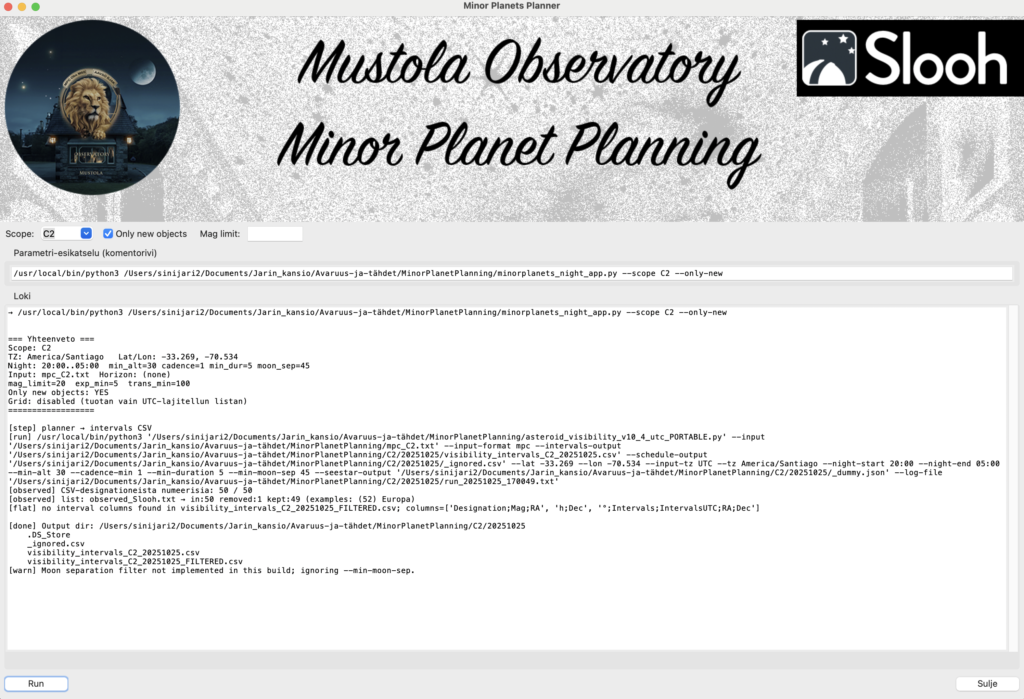
The reward is at the end!
The only required step is to run the MPC asteroid list and copy it (copy/paste) into the telescope’s text input format. In the Slooh case the program outputs a spreadsheet timetable; from that I can pick a suitable target and then book imaging slots in Slooh. The choice depends on the current booking situation, but it’s easy to find three five‑minute slots in a night. With good luck, by the time it’s morning here, the Canary/Chile slots are already taken—and Australia may still have room for one more target.
For my Seestar, the program also creates a more detailed JSON file, which I can upload directly into the community‑developed Seestar_Alp program.
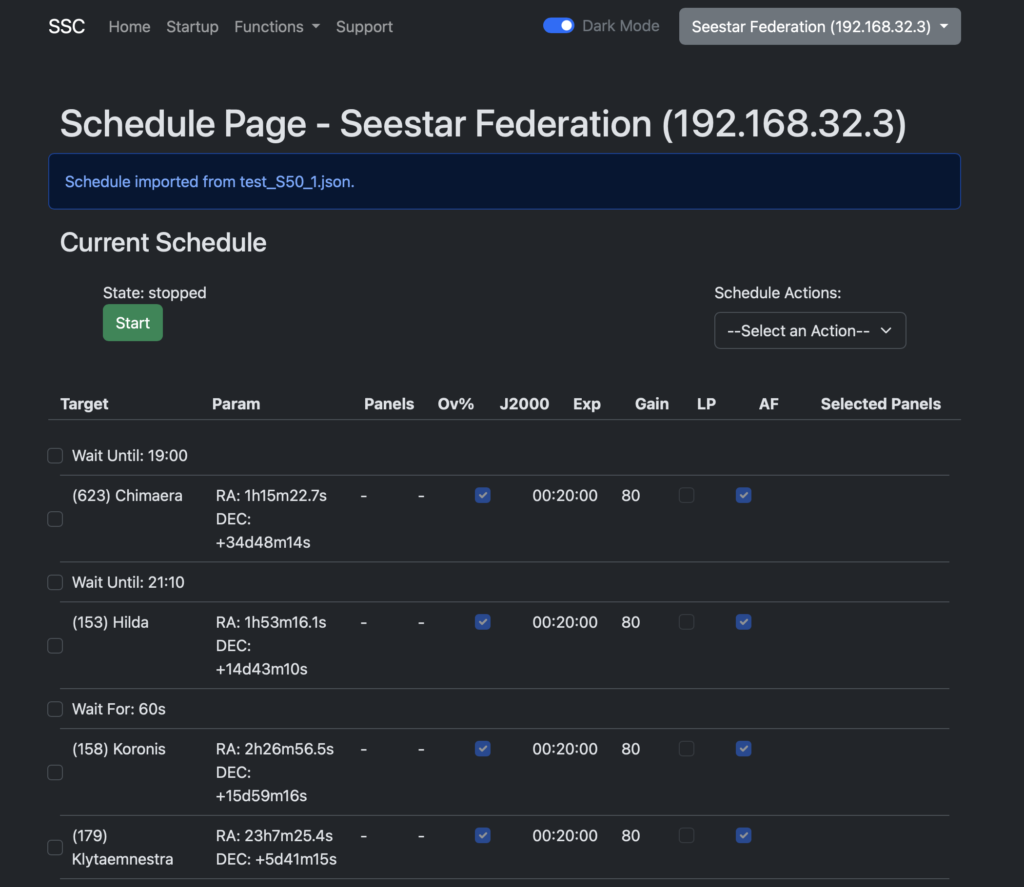
This schedule is then run on the telescope after dark. Unfortunately, if you want to cover all targets brighter than magnitude 14, we probably don’t have enough truly clear nights here. At the moment I’ve observed 59 asteroids, and there must be thousands—but don’t let that discourage you.